

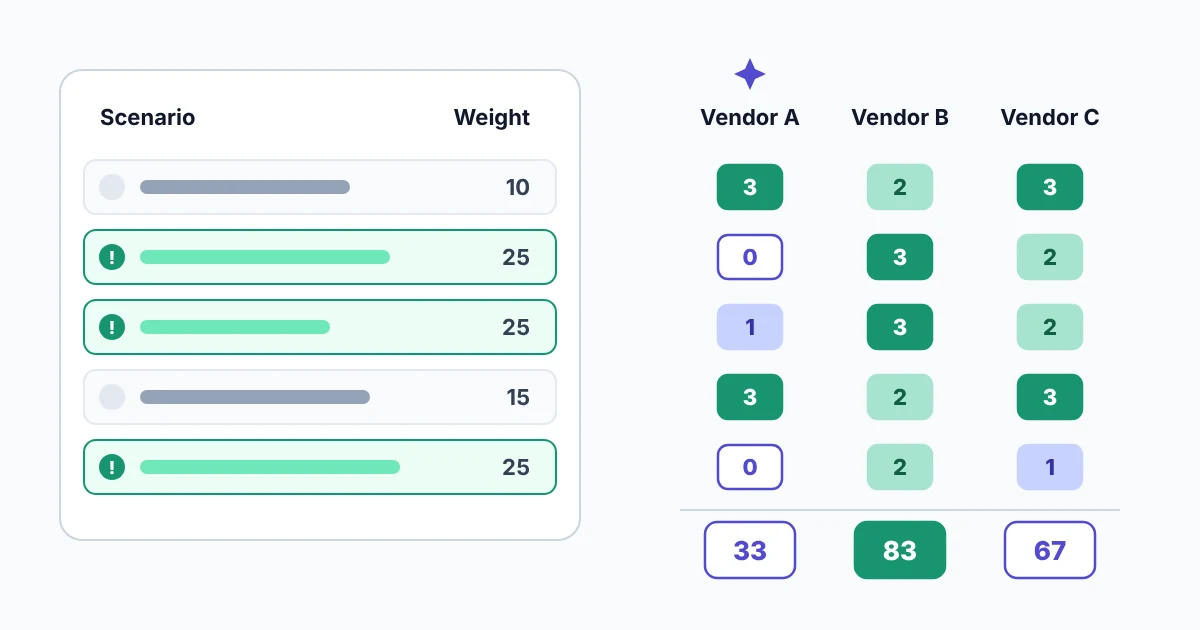
A standard ERP demo shows the vendor's best path on clean sample data, so every shortlisted system can look good. A scripted ERP demo gives every vendor the same scenarios from your business, mostly exceptions, in the same amount of time, scored live by your team against weights agreed in advance. Two rules decide whether it works, and most guides skip them: anything a vendor does not show live scores zero, and the product and the reseller who will implement it are scored separately. This guide sets out the ERP demo script, the scoring rules and a free interactive scorecard to help you compare what vendors actually show.
Ready to score your vendors?
The interactive scorecard on this page holds the scenarios, weights and 0 to 3 scale from this guide. Free, no sign-up, and your entries stay in your browser. Prefer a spreadsheet? Get the same scorecard as an Excel template.
Why standard ERP demos all look the same
Most ERP demos follow a familiar pattern. The vendor introduces the software, walks through dashboards, shows how to create a customer or supplier record, processes a straightforward transaction and finishes with a few impressive reports.
Everything works. The screens look clean, the workflow is smooth and the presenter knows exactly where to click.
The problem is that your business rarely operates under those conditions.
Your difficult days are not the days when every customer pays on time, every supplier delivers in full and every transaction follows the expected route. They are the days when a shipment is short, a customer is placed on credit hold, a supplier invoice does not match the purchase order or a return needs to be processed after the accounting period has closed.
Take a quick commerce order. The system shows two units of a product in the dark store. At the bin, the picker finds one missing and the other past its expiry date. Both are marked out of stock and the customer gets a partial refund. A polished demo shows an order moving cleanly from entry to invoice. It rarely shows what happens to the stock, the refund and the approval when the order breaks halfway through.
That is where the differences between ERP systems start to matter. Can the system manage the exception without losing the audit trail? Does it update inventory and financial records correctly? Are approvals triggered? Can users see what has changed and why?
A demo that does not answer these questions gives you an incomplete picture of the product.
A poor ERP selection can become an implementation problem later, with additional change requests, custom development, workarounds and delays. The consequences are harder to manage once the business has committed to the system. See our guide to what happens when an implementation stalls.
The answer is to stop letting vendors decide what they demonstrate.
Give every shortlisted vendor the same script, use your own business scenarios and score the results against requirements your team has agreed in advance.
If you are approaching a major system change and need help getting the selection right, you can also get your move plan through a free 45-minute working session.
What goes in an ERP demo script?
An effective ERP demo script has five parts: company context, sample data, scenarios, time limits and an unscripted session.
The aim is to give vendors enough information to prepare a realistic demonstration without giving them control over the evaluation.
1. Send your company context in advance
Start with a short briefing document describing how your business operates.
Include the information vendors need to prepare a relevant demonstration:
- Number of employees, business units and operating locations.
- Countries in which you trade and the relevant tax requirements.
- Main financial and operational processes.
- Approximate transaction volumes and business complexity.
- Existing systems and the integrations you expect to retain.
- Reporting, approval and audit requirements.
- Known problems with your current system.
Be specific about what you need the ERP to demonstrate. For example, if you currently run finance in Tally and manage inventory through spreadsheets, explain how those processes interact today.
The point is not to prescribe the solution. It is to establish the business context in which the solution must work.
2. Provide a small sample of your own data
Ask vendors to demonstrate the system using a small, anonymised sample of your business data.
This might include customer and supplier records, products, stock balances, transaction histories, price lists and representative financial records.
Do not send only perfectly formatted records. Include examples of the conditions that create problems in your current operation:
- Incomplete or inconsistent master data.
- Customers with different credit terms.
- Products with multiple units of measure.
- Partially fulfilled orders.
- Supplier invoices that do not match purchase orders.
- Transactions involving different currencies.
Remove confidential and personally identifiable information before sharing the sample. Give vendors sufficient time to load and prepare it.
Also ask them to explain which parts of the demonstration use your actual data, which use substituted data and which are simulated.
Clean sample data can make almost any system look straightforward. Realistic data reveals how much preparation, correction and manual intervention the process requires.
3. Prepare 8 to 12 weighted scenarios
This is the most important part of the ERP demo script.
Prepare between eight and twelve scenarios covering the processes that matter most to your business. Most should test exceptions rather than routine transactions.
For every scenario, document:
- The business situation.
- The expected outcome.
- The users or departments involved.
- The key controls and approvals.
- The reports or records that should be updated.
- Its importance to your selection.
- The time allocated for the demonstration.
Weight the scenarios according to business impact. A process that could stop dispatch, disrupt financial close or create a compliance problem should carry more weight than a feature that would simply make a routine task easier.
The weights must be agreed before the first vendor demonstration.
4. Give every scenario a timebox
Set a time limit for each scenario and apply the same limit to every vendor.
A vendor should not receive extra time to work through a difficult process while another is assessed against a shorter session.
Timeboxing also exposes complexity. If a seemingly straightforward transaction requires several screens, manual adjustments or explanations from the presenter, your team should be able to record that.
Allow time for questions, but keep the chair responsible for bringing the discussion back to the agreed script.
5. Include one unscripted slot
Reserve one part of the session for your team to drive the system.
Ask a process owner to choose a transaction or exception and see how the system handles it without a prepared walkthrough.
This is an opportunity to test navigation, flexibility and the presenter's understanding of the product.
It also helps reveal whether the apparent simplicity of the scripted demonstration depends on a carefully rehearsed sequence.
The exception scenarios that separate ERP vendors
The best scenarios depend on your business, but the following list provides a starting point. Select the ones relevant to your operations and adapt the details to your processes.
Order to cash
Partial shipment and backorder: A customer orders 100 units, but only 70 are available. Can the system dispatch the available stock, retain the balance as a backorder and complete the remaining transaction later?
Credit hold: A customer exceeds the agreed credit limit after placing an order. Can the system stop or restrict further processing, trigger the right approval and record the decision?
Price change mid-order: A product price changes after an order has been entered but before the invoice is raised. Can the system preserve the agreed commercial terms while maintaining an accurate audit trail?
Customer return: A customer buys online and returns the item, damaged, to a store in another region or tax jurisdiction. Can the system receive it into a damaged stock location rather than sellable stock, issue the credit note against the original invoice and show an auditor the chain from invoice to return receipt to the manager who approved it?
Price override at the till: A promotion fails to reach a store's point of sale and the cashier overrides the price. Does the system require a supervisor above a set discount, capture a reason code and keep the before and after price in a log nobody can edit? In India this has to work for packaged goods sold under an older, lower printed MRP, which cannot legally be exceeded.
Procure to pay
Partial goods receipt: A supplier delivers only part of a purchase order. Can the system record the actual receipt, retain the outstanding quantity and prevent an incorrect invoice from being approved?
Purchase order and invoice mismatch: A supplier delivers 500 cases at a higher price than the purchase order, and 15 arrive damaged. Does the system book the good cases at the agreed price, quarantine the damaged ones, block payment when the price variance passes your tolerance and route it to the buyer for approval? Where e-invoicing applies the supplier's invoice cannot be edited, so the system also has to track the supplier's credit note until the tax position is corrected.
Approval threshold: A purchase request exceeds an employee's approval limit. Can the system automatically route it to the appropriate authority?
Inventory management
Stock transfer: Goods move between warehouses or locations. Can the system track the movement, account for goods in transit and show the correct stock balance at each location?
Stock adjustment: A picker finds stock missing or expired, or a count does not match the system. Does the stock leave available to sell immediately, and can users record the write-off with a reason, a manager's approval and a record of who flagged it and when?
Batch, serial or expiry tracking: Can the system trace the relevant item through receipt, storage, movement and dispatch?
Financial management and period close
Return against a closed period: A customer return relates to a transaction from an accounting period that has already closed. Can finance process the required adjustment without silently reopening or changing historical records?
Late supplier invoice: An invoice arrives after period end for goods already received. Can finance handle the accounting treatment, approvals and reporting implications correctly?
Reconciliation and audit trail: Can users trace a financial balance back to the underlying transaction and identify who changed a record and when?
Multi-entity and multi-currency operations
Foreign currency receipt: A customer pays an invoice in a different currency. Can the system record the receipt, calculate the relevant exchange difference and update the financial records?
Intercompany transaction: A transaction takes place between two entities within the group. Can the system record the relevant entries and support group-level reporting?
Local tax and e-invoicing
Include at least one scenario covering the statutory requirements of every country in which you trade.
For example:
- India: Demonstrate GST calculations, applicable tax treatment and the relevant GST e-invoicing process.
- Europe and the Middle East: Demonstrate the applicable VAT treatment and country-specific e-invoicing requirements.
- Americas: Test the relevant sales tax rules, including differences between applicable jurisdictions where required.
Do not settle for a slide explaining that the system supports local compliance. Ask the vendor to demonstrate the transaction, the resulting tax treatment and the associated reporting or invoice output for your actual operating context.
If you are moving off Tally, for example, your script should include the financial, tax and inventory exceptions that your existing processes struggle to handle.
The test is not whether the vendor can describe the feature. It is whether the system can demonstrate the required outcome.
ERP demo scorecard: scoring rules that keep it fair
A scorecard is only useful when everyone understands the scoring rules and applies them consistently.
The biggest mistake is deciding what matters after seeing the demonstrations. Once a persuasive presenter has shown an impressive feature, it becomes tempting to give that vendor more credit.
Set the weights and scoring definitions before demo one.
Step 1: Agree the weights in advance
Assign a weight to each scenario based on its importance to the business.
For illustration, a company might give the following priorities to its evaluation:
| Evaluation area | Illustrative weight |
|---|---|
| Order to cash | 25% |
| Procure to pay | 20% |
| Inventory management | 20% |
| Financial management and period close | 20% |
| Multi-entity, multi-currency and local compliance | 15% |
| Total | 100% |
These are example weights, not a universal allocation. A distribution business may prioritise inventory and order fulfilment. A multi-entity organisation may place more weight on financial consolidation and reporting.
Agree your actual weights with finance, operations and IT before the first demonstration. Do not change them to improve a vendor's position.
Step 2: Use a defined 0 to 3 scoring scale
Give each scenario a score from zero to three.
| Score | Definition | What it means |
|---|---|---|
| 0 | Not demonstrated | The vendor says it can be done, but does not show it live. Roadmap items and promised partner development also score zero. |
| 1 | Partially demonstrated | Some of the process works, but important steps are missing or depend on manual workarounds. |
| 2 | Demonstrated with limitations | The end-to-end process works through demonstrated configuration or a controlled workaround, but there are limitations or additional effort to consider. |
| 3 | Fully demonstrated | The system completes the scenario successfully, using realistic data and showing the relevant controls, records and outputs. |
The most important rule is simple: what is not shown live scores zero.
This includes statements such as:
- “We can configure that.”
- “Our implementation partner can build it.”
- “That feature is on the roadmap.”
- “It will be available in the next release.”
- “We have done this for another customer.”
These statements may be worth investigating during due diligence, but they are not evidence of demonstrated capability.
If a vendor claims that a configuration will solve the problem, ask them to demonstrate it. Record how it works, who will configure it, what additional effort is involved and what happens during upgrades.
A promise is not a passing score.
Step 3: Calculate the weighted score
For each scenario, multiply its weight by the score divided by three.
Weighted points = (Scenario score ÷ 3) × Scenario weight
Add the weighted points for all scenarios to get an overall score out of 100.
For example, if a scenario has a weight of 20 and a vendor scores two out of three, the vendor receives approximately 13.3 weighted points.
This gives your team a consistent way to compare demonstrations while recognising that not all requirements have equal importance.
Keep the individual scenario scores visible. An overall score can hide a serious weakness in an important process.
Step 4: Make each attendee score independently
Everyone attending should complete their own scorecard before the team discusses the demonstration.
Do not allow the vendor's presenter, the most senior person in the room or the most confident member of the selection team to influence the initial scores.
Once everyone has submitted their assessment, compare the differences.
A finance manager may consider an accounting workaround unacceptable, while an operations manager may think it is manageable. That discussion is useful. It helps the team understand where the real business trade-offs sit.
Record the reasons for significant differences rather than simply agreeing on an average score.
Step 5: Score the ERP product and implementer separately
This distinction is particularly important in mid-market ERP selections.
The person demonstrating the product is often a reseller or implementation partner. That organisation may also earn revenue from the software licence and the implementation project.
But two different decisions are being made:
- Is the ERP product suitable for your business?
- Is the implementation partner capable of delivering it successfully?
Do not combine these decisions into one score.
The product assessment should cover demonstrated functionality, reporting, integration, controls, usability and how well the system handles your scenarios.
The implementer assessment should cover its understanding of your processes, the quality of its answers, its proposed implementation approach, the experience of its delivery team, its handling of risks and the availability of ongoing support.
Ask who will actually lead the implementation and who will configure, migrate, integrate and support the system. Evaluate the people and organisation responsible for that work, not just the person presenting the demo.
A strong product cannot compensate automatically for a weak implementation partner. Equally, a confident and experienced partner cannot make an unsuitable product the right choice.
For a more structured evaluation, see our approach to independent systems selection with structured demos.
ERP vendor demo questions to ask in the room
Once the scripted scenarios are complete, use the discussion to establish what sits behind the demonstration.
The following ERP vendor demo questions can help expose differences between the product, the proposed implementation and the ongoing cost of ownership.
1. What was standard, configured or custom in what we just saw?
Ask the presenter to classify each important capability. Get a clear distinction between existing product functionality, configuration performed for the demonstration and custom development that would be needed for your business.
2. Who will actually build or configure this for us?
Ask for the names or roles of the people responsible. Will the work be completed by the vendor, the proposed implementation partner or another third party?
3. What happens to this configuration during an upgrade?
A solution that works today may introduce additional work during future releases. Ask how customisations and integrations are maintained, tested and supported through upgrades.
4. What additional licences, modules or third-party tools are required?
A feature shown in the demo may depend on a separate module, integration platform or additional service. Ask what is included in the proposed scope and what would need to be purchased or developed separately.
5. Can you show the integration with our existing systems?
Do not accept a diagram or slide in place of a demonstration. Ask the vendor to show how data moves between the ERP and the systems you actually use.
What happens when an integration fails? Can transactions be retried? How are errors identified and resolved? Which system holds the authoritative record?
6. Can you produce one of our actual management reports?
Provide a report your finance or operations team uses today. Ask the vendor to reproduce it using your sample data.
This tests whether reporting is genuinely available from the system and whether the necessary information can be accessed without exporting data into spreadsheets.
7. Who supports us after go-live?
Ask who handles support, how issues are escalated, what responsibilities sit with the software vendor and which sit with the implementer.
Ask about support arrangements during critical periods, including month-end close.
8. What would you put outside the standard implementation scope?
This question can be more revealing than asking what the software can do. It encourages the vendor to identify assumptions, limitations and possible change requests before you commit.
For further due diligence, use our questions on vendor access and data risk.
What to do after the ERP demos
The final demonstration is not the end of the selection process. It is the point at which your team should turn observations into evidence and decisions.
Reconcile scores, not opinions
Bring the individual scorecards together and identify where attendees agree or disagree.
Look beyond the overall weighted score. Review the individual scenarios, especially those with the highest business impact.
A vendor with an impressive total score may still have a critical weakness in inventory controls, statutory compliance or financial close.
Record the reasons behind the scores so the decision can be explained later.
Get unanswered questions in writing
Prepare a list of every item that was not demonstrated, every limitation identified and every commitment made by a vendor.
Ask for written answers covering:
- Functionality that was not shown.
- Additional configuration or custom development.
- Implementation ownership and dependencies.
- Licensing and third-party requirements.
- Upgrade implications.
- Integration and reporting limitations.
- Support responsibilities.
Keep these responses separate from the live demo scores. A written assurance may help your due diligence, but it should not retrospectively turn an undemonstrated feature into a demonstrated capability.
Speak to relevant customer references
Ask for reference customers with a similar business size, operational complexity and implementation scope.
A company with 50 employees may have very different needs from one with 1,000 employees. A successful deployment in a simple single-location business does not necessarily establish suitability for a multi-site or multi-entity operation.
Where possible, speak to customers who were not selected by the vendor. They may offer a less rehearsed view of the experience.
Ask about data migration, implementation delays, change requests, user adoption, reporting, support response and the experience of managing upgrades.
Do not ask only whether the customer is happy with the product. Ask what they would do differently if they were selecting and implementing it again.
Make two decisions before making one commitment
Your final assessment should identify the preferred ERP product and the preferred implementation partner separately.
If you have any significant gaps, resolve them before signing. A low score on a critical scenario should not disappear because the vendor performed well elsewhere.
The objective is not to select the best presentation. It is to select a system and delivery team that can support your business through routine operations, exceptions and future change.
For more support with ERP selection and migration advice, take a structured approach before committing to implementation.
Use the interactive ERP demo scorecard
Running a consistent evaluation is much easier when every vendor is assessed the same way.
The interactive ERP demo scorecard on this page helps your selection team prepare scenarios, agree weights and record results during each demonstration.
It includes:
- A scenario list covering the major ERP business processes.
- Space to add your own company-specific exceptions.
- Weighted scoring fields for each scenario.
- A 0 to 3 scoring scale with clear definitions.
- Separate scores for the ERP product and the implementation partner.
- A summary to compare vendors and review weighted scores.
Use it as a starting point. Adapt the scenarios and weights to your business before inviting vendors to demonstrate their systems.
Prefer to work in a spreadsheet, or want every attendee to score in their own copy? The same scorecard is available as an Excel template, with the formulas built in.